Showing posts with label DoubleCameraBox. Show all posts

Saturday, 1 June 2019

Dual camera birdbox 2019 update: Mistakes, Fixes, Bodges, nesting success and same year re-nesting

The dual camera bird box build started off back in 2016, and has been live since the 2017 Spring nesting season. It was my second Raspberry Pi-based birdbox, and my first attempt to combine a Raspberry pi camera module with a USB webcam on the same Raspberry pi mini-computer.  The system has video motion-capture, day + night illumination modes, an entrance hole activity logging mechanism, and also monitors temperature (?why not)...

Nearly fledging: My favourite picture of the 2019 season

This year (2019) is its first successful nesting season, seven great tit chicks fledged a few weeks ago, with another pair currently sitting on five eggs. I've had some requests on the Twitter about his box so this is an attempt to describe some of the modifications I've made over the last few years to fix various issues, and share some of the stuff I've learned along the way.

That's a 32mm entrance hole 

The Cameras

Camera 1 (SIDE): This is a Microsoft LifeCam Cinema usb webcam.  It can only see in visible light - I used one of these in my first birdbox (side-view-box, 2016).  A motion-jpeg (mjpeg) network video stream from this webcam is picked up by a remote PC running iCatcher CCTV software.  iCatcher isn't able to include audio from this source.

Camera 2 (TOP): This is a Raspberry Pi v2 Infra-Red (IR) camera positioned above the nest space.  An IR-cut module sits between the camera and the main nesting chamber and switches it between IR (night/dark) and visible light sensitivity (day/lit) .  A motion capture application called pikrellcam uses this camera, with the videos saved directly to the same networked PC mentioned above.  Camera-1 (the webcam) has a handy built-in microphone that pikrellcam cleverly uses, adding sound to the captured video from camera 2.

Camera 1 (Side) fits into height-adjustable slots.  Entrance hole is on the Left of this pic

The entrance hole has two IR beams that once broken record the event to a file.  Based on the order of breaking it's possible to work out whether the bird is coming or going.  I added a visual indicator to check this is working, the video below shows the outer then inner beams being triggered whilst I balance precariously up a ladder...


The Brain: This is a Raspberry pi model B+.  It's powered over a single cat5 network cable run of approx 150 meters using power-over ethernet (PoE),  which also connects it to my home network.

Yes, I know the wiring is a mess...
Practicalities of video review
The side camera can be reviewed directly via iCatcher console on a remote PC, or via a webpage using any network connected device.  Exporting video / screengrabs from iCatcher is a pain in the proverbials.

iCatcher Console with Camera-1 as source (USB webcam.  Visible light only.  No audio)

The top camera (Raspberry Pi cam) can be reviewed in a web browser on any network-connected device.  Exporting video / images is really easy and can be downloaded directly via a web browser.

Pikrellcam with Camera-2 as source (Raspberry Pi v2 IR camera+IR cut (day mode)_white LEDs on.  WITH Audio

Design evolution, 2017 to now (May 2019)

2017: The Bird Box went up in April.  No birds came in all year with just the occasional wasp and spider triggering video capture (pikrellcam).  The entrance hole had logged some attempts that were probably birds popping a head in, so assuming  that the hole was too small, I enlarged it from 20mm to 32mm over the Winter.  This wasn't as simple as just drilling the hole bigger as the entrance hole IR activity detector beams needed moving to accommodate a bigger hole.  The 'glass partition' between the side camera and the main nesting chamber kept getting dusty and it also created an annoying reflection of the side camera (which could essentially 'see itself'), so I replaced it for a half height plywood partition that the camera could see over, giving it an unimpeded view into the box, as well as allowing its microphone do a better job.


This box did do some useful work that season - Using a programme called ffmpeg, I used it to transcode a video feed from a separate, less-powerful Raspberry pi/usb webcam combo on a Robin nest and live-stream the result to YouTube.

2018: The enlarged entrance hole meant birds were coming in periodically, probably looking for food.  The default lighting remained on 'night mode' (just infra-red) as I thought the birds would be put off by the visible light LEDs.   I also hadn't got round to making the day-night switching happen automatically.

By April we had a pair of great tits bringing in moss.    I had the 'bright' idea of making the white leds come on when movement was detected by pikrellcam software to improve the daylight video capture... bad idea.  What I actually ended up with was a system that kept switching from night to day mode whenever a bird came in.  I think that the 'thunk' of the IR cut module switching between modes freaked them out so they nested in a neighbour's box instead.  That was the end of Spring 2018 nesting.

THIS YEAR.. 2019: A great tit pair started making visits from early March this year.  Nest building started 10 March, nine eggs laid and eight hatched on approx 17 April.  The last one fledged two weeks ago 7:50am on Sunday 5th May.  Unfortunately I missed them hatching as the PC where the videos are saved had crashed and I was away on holiday.

I also got around to fixing the day/night transition as described in this post, so lights come on at sunrise and off at dusk (switch to IR mode).

A selection of images / videos from nesting session 1

Cropped-in still image from camera 2.  Lighting aided by south-facing window on RHS of this image

Feeding False Black Widow Spider
Difficulty swallowing another false black widow spider

The next image is a screen-grab from a top camera video.  These are really easy to make using vlc media player.

An explosion of Great Tits

This is the male on the day the last chick fledged.  He's looking a bit battered

Scruffy male adult after the chicks all fledged

So... I though that was it for this season, which was timely as we were just about running out of disk space on the PC that stores the captured video.  I removed the remains of the deceased chick, and in the process broke the night illumination mode...

This one didn't make it :(
I switched from motion capture to timelapse on the last couple of days (pikrelcam makes this easy).  I converted this to a timelapse using Adobe Lightroom then converted it to a manageable size in vlc.  The dead chick above sadly passed away during this period which is evident particularly in the overnight section...


Poo-cam?
Daylight-sensitivity / video quality from the top down camera had dropped considerably over the previous year.  With no physical partition, the chicks were able to have a lovely time jumping up and down and pooing on the the side camera too.......Leaving a 'poo-obscured cam in the day, cant see anything at night' bird box.

Surprise 2nd nesting
...But 5 days later, another Great tit pair have moved in (Fri 17 May) and re-built the nest.  I've never had two back to back nests in the same box before.

And who miss, are you? this is the second female re-building the nest
So, poo-cam, poor lighting an degraded image quality will never do, so I removed the top camera section and cleaned the mess off the side camera that you can see in the picture above.

Top camera modifications... New Daylight LEDs / IR cut replacement
The Raspberry pi camera has poor low light sensitivity so I wanted to improve the lighting.  I swopped some of the existing 5mm LEDs for some LED panels from Pimoroni- I've used these in four other bird boxes I built this year see here.  They give a nice even illumination, avoiding the spotlight effect you get with 5mm LEDs.  You can see my original attempt to avoid spotlighting with the original 5mm leds by pointing them up towards a white background, but they don't really make enough light for the Raspberry Pi camera which has fairly awful low light sensitivity which isn't surprising given that its lens aperture is a couple of mm.

New LED panels on underside of top section

 I also swopped the IR cut for a new one (see this post) as the old one had fogged up.

2019 2nd nesting, updated performance...
Our five eggs have yet to hatch, the image quality is much better:

Cropped down to show detail.  I like the symmetry in this one
I'm using a python module called ephem to trigger the day to night lights-off at sunset, however she's usually tucked up 1 to 1.5 hrs before then.  Here you can see aside camera view before the upgrades (or cleaning the webcam...)

Female number two turning in for the night
The new pair has a different male
Male number 1 was looking very shabby at the end of the the last nesting session.
This clip shows make number 2 feeding female number 2 while she's incubating her five eggs, he's not scruffy, so Ithink that he's a different bird.  Can't say much about her though.


More to come... when this lot hatch


Sunday, 29 April 2018

2018 Nesting Season, False starts and Late starters

I had almost given up on nesting this year after some promising early interest in the double camera box fizzled out. BUT all is not lost!...


Great Tit checking out double camera box
Side camera footage, female Great tit:


We had some nesting material brought in (this one has sound)


But that was about it for this box...

BUT all is not lost!

The BirchLog Box that I put up a week ago started off this morning like this:

BirchLog Box, Infra-red illuminated, blue tit. Clay blob on the floor, 8:30 am
The thing that looks a bit like a slug on the floor is a piece of air-drying clay which was supposed to help support the plywood roof, I used hot-glue in the end and didn't bother removing the clay, a piece fell out and seen here littering the floor.  I had thought to retrieve it, but in the end the blue tits cleared it out themselves.

By the end of the day, the box looks like this:
BirchLog box, visible light-illuminated, 6:30 pm
The blue tits have had a very busy day 1.  I got this nice pic of one on its way on:

Blue tit on its way into BirchLog box
Here are a couple of video clips of today's nest building efforts:

This is using the Infra-red illumination


This is is with the visible light leds on instead

Borrowing a feather from next doors chickens

Roosting overnight...


Saturday, 24 February 2018

Coding for day or night events

This post was promoted by a post on the  GarysShed blog after a discussion on triggering events based on whether it's day or night time.

To be fair, the whole post is an excuse to include following video from the BBC's 'Walk on the Wildside' series


I needed to modify the behaviour of the illumination LEDs in one of my Raspberry Pi-based  birdboxes based on whether it is light or dark.  This box has IR (Infra-Red) as well as visible light LEDs, I wanted the IR to operate all the time, and the standard LEDs to come on (and IR LED go off) only in the event of a daytime  motion 'event', which could be triggered by any of:  Entrance hole IR beam being broken, PIR insider the box triggered or motion detected on camera.

An IR-cut filter over the camera can then be switched on or off depending based on this too - IR LED off when visible LEDs are on.  (An IR-cut filter turns an IR-sensitive camera into a daylight-only sensitive camera).

The idea was that I didn't want visible LEDs coming on during the night, mainly to disturb any occupants, I also didn't want this happening as it looks a bit odd from the outside:

Possible solutions:
1) Analyse camera image for brightness
2) Use a light-dependent resistor (LDR) to sense ambient light and modify LED behaviour based on this.
3) Implement a software-method to predict day vs night based on longitude and latitude

1) Analyse camera image for brightness.  Borrowed code from here and here and here
convert test.png -colorspace hsb -resize 1x1 txt:- | sed -n 2p | sed 's/.*(//; s/).*//'

If run in the terminal, will output something like: 81.857%,38.706%,17.7462% where these figures are the HSB (hue, saturation, brightness) values from a 1x1 pixel converted version of the original image (test.png in this example)

2) Use LDR to monitor light.  There's loads of examples out there how to do this, a randomly selected recent one here

At one time I did a merge of method 1 & 2 to which I've uploaded to a github repository Ambient-Light-Monitoring, the script is called ambient_lightMonitor.py.  This reads actual light level via an  LDR, and also takes image with a Raspberry Pi Camera and measures image brightness.  All these variables are then written to a file for playing with which could be applied with in a variety of contexts..

3) Software method
I've tried two approaches, both rely on feeding the application the current location via longitude and latitude.

3.1) SunWait.  A stand-alone program, an example use is described in a blog post here.  Essentially you run a crontab job every ?minute that writes to a file to indicate the current light/dark state.  You can then read that file into your application and base the outcome on whether its day (..light) or night (...dark).  I could not get it to work..

3.2) Python module: pyephem, website here
This is a python module, so is used within a python script.  You need to install python-dev first or the install of this module will fail. The module can then be installed with the pip python module installer
sudo apt-get install python-dev
sudo apt-get install python-pip  #if pip not available, e.g. on Raspbian Lite
sudo pip install ephem
Note, the sudo bit is important otherwise if you attempt to run a python script from rc.local  containing this module (to run it at boot) the root user wont be able to find the module since without 'sudo...' it will install ephem under the user 'pi'

This approach worked for me.  Longitude and Latitude can be generated on various websites, eg here, pyephem also uses height above sea level which I think I got off google earth.  This would be aprticularly relevant if you're using it at the top of a mountain....
Refer to the example script light_dark.py in the above mentioned githib repository

3.3) ?Pikrellcam motion capture application
I use the awesome motion capture application PiKrellCam in my birdboxes.  In its .config file is the facility to define location by longitude and latitude.  I spotted a recent forum post querying if it was possible to switch an IR-cut filter on or off by using the day/night status within Pikrellcam to trigger a command to the GPOI pin(s) controlling the IR cut.  See my IR-cut post on how to wire such a thing up.

Thursday, 31 August 2017

Control BirdBox LED lights via a simple webpage

This year's 'Double Camera' bird box has a variety of illumination options...

I wasn't sure how best to setup the internal lighting, so I, well threw a selection of LEDs at it in three separate circuits/loops, These are on 12v circuits, and are isolated from & switched by the (5v) raspberry pi via a ULN2003AN transistor ic.  I used all 7 base input channels, with the collector outputs switching the 12v LED loops through a selection of resistors as follows:

Loop 1) 4x 'Warm' LEDs: LOW (10k ohm) and HIGH (330 ohm)
Loop 2) 3x 'White' LEDs: LOW (10k ohm) and HIGH (330 ohm)
Loop 3) 36 IR LED array: LOW (10k ohm), 'MED' (5k ohm potentiometer) and ('HIGH' 330 ohm)

+ An opaque perspex 'windows' at either end for the natural light options..

Once the birdbox was in-situ, I wanted a simple way to fiddle about with the lighting, and came across Matt Richardson's excellent Flask  tutorial, specifically his weblamp.py script example.  This creates a webserver within python that allows me (and the kids...) to turn LEDs on, off up or down via a simple webpage:


The tutorial is an excerpt from his Getting Started with Raspberry Pi: An Introduction to the Fastest-Selling Computer in the Worldbook

Just for fun - someone's at home....
I've adapted this for my needs as follows:

import RPi.GPIO as GPIO
from flask import Flask, render_template, request
app = Flask(__name__)

#http://mattrichardson.com/Raspberry-Pi-Flask/

GPIO.setmode(GPIO.BCM)

# Create a dictionary called pins to store the pin number, name, and pin state:
pins = {
   25 : {'name' : 'LED_IR_High', 'state' : GPIO.LOW},
   8 : {'name' : 'LED_IR_Med', 'state' : GPIO.LOW},
   7 : {'name' : 'LED_IR_Low', 'state' : GPIO.LOW},
   16 : {'name' : 'LED_Warm_High', 'state' : GPIO.LOW},
   12 : {'name' : 'LED_Warm_Low', 'state' : GPIO.LOW},
   21 : {'name' : 'LED_WHITE_High', 'state' : GPIO.LOW},
   20 : {'name' : 'LED_WHITE_Low', 'state' : GPIO.LOW}
   }

# Set each pin as an output and make it low:
for pin in pins:
   GPIO.setup(pin, GPIO.OUT)
   GPIO.output(pin, GPIO.LOW)

@app.route("/")
def main():
   # For each pin, read the pin state and store it in the pins dictionary:
   for pin in pins:
      pins[pin]['state'] = GPIO.input(pin)
   # Put the pin dictionary into the template data dictionary:
   templateData = {
      'pins' : pins
      }
   # Pass the template data into the template main.html and return it to the user
   return render_template('main.html', **templateData)

# The function below is executed when someone requests a URL with the pin number and action in it:
@app.route("/<changePin>/<action>")
def action(changePin, action):
   # Convert the pin from the URL into an integer:
   changePin = int(changePin)
   # Get the device name for the pin being changed:
   deviceName = pins[changePin]['name']
   # If the action part of the URL is "on," execute the code indented below:
   if action == "on":
      # Set the pin high:
      GPIO.output(changePin, GPIO.HIGH)
      # Save the status message to be passed into the template:
      message = "Turned " + deviceName + " on."
   if action == "off":
      GPIO.output(changePin, GPIO.LOW)
      message = "Turned " + deviceName + " off."
   if action == "toggle":
      # Read the pin and set it to whatever it isn't (that is, toggle it):
      GPIO.output(changePin, not GPIO.input(changePin))
      message = "Toggled " + deviceName + "."

   # For each pin, read the pin state and store it in the pins dictionary:
   for pin in pins:
      pins[pin]['state'] = GPIO.input(pin)

   # Along with the pin dictionary, put the message into the template data dictionary:
   templateData = {
      'message' : message,
      'pins' : pins
   }

   return render_template('main.html', **templateData)

if __name__ == "__main__":
   app.run(host='0.0.0.0', port=90, debug=True)

Make it executable as follows:
chmod 755 weblamp.py

Add the following toward the end of /etc/rc.local to make it run at boot:
python /home/pi/Documents/BirdCam2/flask/WebLamp/weblamp.py &

The IR sensitive camera is a v2 Raspberry pi Pi Noir (Camera 1).  Unsurprisingly, the IR HIGH setting to just too bright, with the MED setting being the sweet spot.  IR_Low (10k ohm) barely registers... At the moment I've got it set to IR_Medium.

I haven't made much use of the non IR LEDs yet, but the LifeCam Cinema webcam (Camera 2) does not see very well without them being on, which is bit of a shame.  Maybe a ver 2018 box could have bigger natural light windows (Or I'll take a hacksaw to this one...).


We've seen a fair number of wasps taking an early interest and this Hornet (I think) taking a look... This is using the IR LED array and Pi Noir v2 camera


The LifeCam version looks like this.. the lesson is that I need a motion trigger on the non IR LEDs as there is only natural daylight illuminating this:


Some thoughts...
36 IR leds is excessive.
The raspberry v2 Pi Noir daylight light sensitivity is not good (with IR cut, so conceivably this is reducing the 'useful' daylight sensitivity).
I dont use the 'LOW' setting on the WARM or WHITE leds
LifeCame Cinema needs more natural light for unassisted daylight video (bigger windows)
Need an 'on-motion' event to turn on non-IR leds.

Friday, 7 April 2017

2017 Double camera Bird Box - Intro

Our 2017 double-camera bird nestbox went up a couple of weeks ago.  This is a two-camera setup built around a conventional wooden box design... with a Raspberry Pi 3 for a brain.  The box gives a day and night (infra-red / IR) video options (e.g. to check for roosting at night), with separate 'from above' IR and 'from the side' daylight cameras.  It has a temperature, humidity and ambient light sensors, the latter to automate interior illumination with either visible light or IR leds, all of which have high and low settings.  It's connected directly to the local network so all video storage is handled off-box (as it were).  All we need now is some birds...
2017 double camera bird box
Components

Brain: RaspberryPi 3.  Most of the electronics gizmos interface via a female to male header + perfboard 'shield' that plugs into the GPIO header pins of the raspberry pi.
Power: This is via Power-overEthernet (PoE) using this TP-LinkPoE kit (~£20).  This allows one cable for power and network access, and provides a 12v feed for the LED illumination and IR-cut, which is also dropped to 5v for the Raspberry Pi using a RECOMR-7885.0-1.5 module (~£10)
Top-down camera (Cam -1): InfraRed Raspberry Pi v2 camera module (~£22.79).  This does higher resolution, fixed focus motion-activated video and image capture, using the excellent PikrellCam software.  Video is saved direct to my local network to overcome local storage issues.
InfraRed cut-out filter:  This switches a filter in front of Cam- ( the Pi v2 IR camera), in the daytime for normal-looking daytime images a and video.  In low light/dark, the IR filter is pulled back and IR led array activated for unobtrusive night viewing.  this is interfaced to the Pi's GPIOs via an L2930NE ic.
Side-view camera (Cam-2): MicrosoftLifeCam Cinema (~£15 ebay).  This is the 'dumb-camera', and just generates a video stream that is monitored by a windows PC running iCatcher CCTV software.
Illumination: There are 3 lighting circuits, (1)3x 'White' leds recycled from a broken torch, (2)4x  'Warm' leds (from the 'drawer of stuff'), (3) an 36 LED IR led.  The latter is coupled to a 5k variable resistor as full power causes a white-out.  These three lighting options work off the 12v feed and have low and high settings.  The 12V LED circuits are switched by the Pi's GPIO pins via a ULN2003AN ic.  I used some different types of LEDs since I didn't know what would work the best ultimately.
IR array
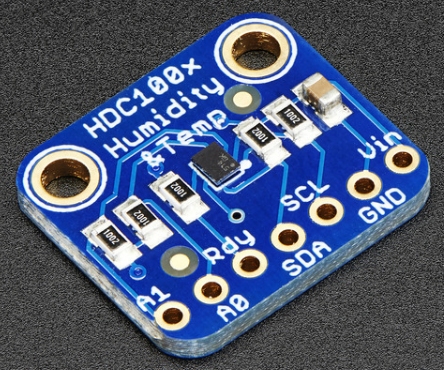
Temperature and Humidity: HDC1008  I think these are now discontinued, but as this was 'in the drawer of stuff', in it went.   This sits in a separate, vented compartment and logs outside temperature and humidity to a MySQL database.

Entrance hole counter: The box has a 25mm entrance hole, with in outer and inner IR detector beam, as such we can distinguish between entering/exiting/head pop in/head pop out.
see these updated posts for a 2019 version of the entrance hole counter:
http://nestboxtech.blogspot.com/search/label/EntranceCounter

Other stuff:  I've also added inside and outside PIRs as an alternative way of measuring activity - but haven't worked this bit up yet...

It's built in a modular fusion so that it can be relatively easily dismantled.  The circuitry for the entrance counter is housed separately, into a compartment in the front panel of the box, and connected via a hacked cat5 cable and jack to the Pi shield.

Some pictures...
Easy access side door.
Showing position of side camera and opaque windows for illumination

The main box area is under the wiring bit, with glass partition separating webcam section
Raspberry Pi Shield in detail

One of two vents for the HDC1008 temp and humidity sensor

In situ

As I develop more of the software side of things I'll post updates at intervals.

Tuesday, 21 March 2017

2017 Double camera Bird Box - sneaky peek

My 2017 Bird Nest Box should hopefully be up and running later this week, hopefully not too late for this season.  This version has two camera:  A 'from the side' camera which is a webcam (as described in previous posts), and a 'view from above' camera that uses as raspberry pi InfraRed (IR) camera with Infrared-cut to allow night and daytime viewing, I've added dimmable IR and non-IR led illumination.  The RPi camera does video capture via the marvelous program PikrellCam.

Test screen shots below (Microsoft LifeCam above, Raspberry Pi v2 IR cam below)

Daytime
Daytime previews
Night-time
Night time previews
I've also included an entrance hole counter and facility to measure ambient temperature and outside light levels.

More details to follow....